Many average users are not particularly interested in the technical intricacies of a laptop and whether it can deliver a stable 60 FPS in Fortnite at maximum graphics settings. After all, for them, it is primarily a work tool that should handle office and multimedia tasks well. Ideally, it should also look nice, be quite light and thin, have a good screen, and be affordable.

Today we will get acquainted with the Vinga Iron S140 laptop. It meets most of the requirements for an inexpensive laptop. And the price of $397 (10999 UAH) looks very attractive. So let's take a closer look at it!
Specification
|
Model |
Vinga Iron S140 (S140-P50464GWP) |
|
Processor |
Intel Pentium Silver N5000 (4 x 1.1 – 2.7 GHz; L2 – 4 MB) |
|
Display |
BOE-Hydis NV140FHM-N62: 14", IPS, 1920 x 1080 (157 PPI), LED backlight, protective glass |
|
Graphics Adapter |
Intel UHD Graphics 605 (18 x 200 – 750 MHz) |
|
RAM |
4 GB LPDDR4-2400 MHz |
|
Disk Subsystem |
64 GB eMMC |
|
Card Reader |
microSD |
|
Interfaces |
1 x Mini-HDMI 1 x USB 2.0 1 x USB 3.0 1 x combined audio jack |
|
Acoustics |
Stereo |
|
Microphone |
Stereo |
|
Camera |
2 MP |
|
Networking Capabilities |
802.11a/b/g/n/ac Wi-Fi and Bluetooth 4.2 (Intel Wireless-AC 3165) |
|
Sensors |
Fingerprint scanner |
|
Battery |
Lithium-polymer: 7.6 V, 5000 mAh, 37 Wh |
|
Charger |
Input: 100~240 V AC at 50/60 Hz Output: 12 V DC, 2 A |
|
Dimensions |
332 x 222 x 14 mm |
|
Weight |
1.38 kg |
|
Color |
Gray |
|
Operating System |
Windows 10 Pro |
|
Official Warranty |
12 months |
|
Manufacturer's Website |
Supply and Package


Vinga Iron S140 is packed in a small box made of dense cardboard. It is designed in black tones and allows you to not only appreciate the appearance of the product but also its key features.

Along with the laptop, we found a tablet-like charger with a fixed cable and user documentation.
Appearance, Element Placement
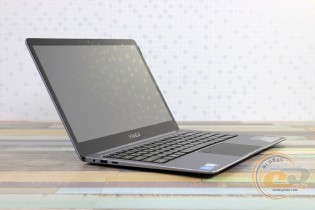
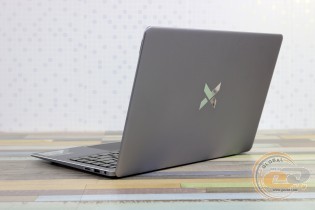
The design of the Vinga Iron S140 completely repeats the previously tested model Vinga Twizzle J116, but due to its larger size, it is thinner and more elegant. The body has a tapered shape towards the front with smooth contours. It is adorned with chrome edges around the perimeter, and the lid features a mirrored brand logo. The novelty clearly looks more expensive than its price and can easily be perceived by others as a premium ultrabook.
The materials are also appropriate; for example, the chassis is entirely made of noble aluminum. Only the keyboard and the protective screen frame are made of plastic. The latter is covered with tempered glass. The surfaces that the user most often touches (lid, bottom, palm rest area) are matte and smooth. This means they are not only pleasant to the touch but also practical in everyday life.

The size and weight of the novelty are also pleasing. In terms of overall dimensions, it is quite comparable to modern ultra-compact laptops, and in some cases, even better than them. For example, the Acer Swift 1 with a similar configuration is 250 g heavier and slightly thicker. Simply put, even delicate girls will not have much difficulty taking the device with them to the office, classes, or any other trips.

The positive impression of the laptop's appearance is complemented by thin bezels around the screen. However, the bezel itself is black, which, combined with the glossy surface, leads to active reflections and glare of the surrounding environment on the screen.
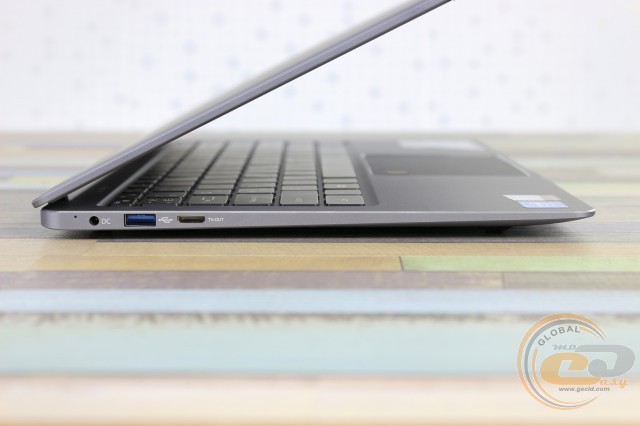

The display unit is attached to the base with a shelf hinge. It is quite tight but allows the laptop to be opened with one hand. And since the top cover is not much longer than the base and there is a small cutout, it is convenient to lift.

The maximum opening angle is about 140°, which is sufficient for working at a desk or on your lap while sitting on your favorite sofa. The position fixation is good, with no shaking or rattling.
The number of ports in the Vinga Iron S140 is small, with only the essentials. On the right, there is a microSD card reader, a USB 2.0 port, and a combined 3.5mm audio jack. On the left side, there are: Mini-HDMI, USB 3.0, and a power connector. So, if necessary, you can connect a mouse, storage device, external display, or memory card of the most common format. Considering the more available space on the sides than in the previously tested "baby-transformer" Vinga Twizzle J116, the number of external interfaces could have been expanded.

On the base of the laptop, there is a hatch, four grippy rubber feet, and a pair of speakers.

By unscrewing two screws, we gain access to the installation site for an 80 mm long M.2 drive. This allows you to expand the disk space without losing the warranty.

If the last fact doesn't scare you, by unscrewing a series of cross screws and freeing the latches, you can access the internal components of the laptop. It is clearly visible that everything is soldered on the motherboard, so the upgrade is limited to installing an SSD drive.
The build quality and rigidity of the Vinga Iron S140 are top-notch. Nothing bends or creaks. The only remark is the tight connection of peripherals, but this is not critical.
Input Devices

The width of the working area allowed the laptop to be equipped with a full-size keyboard, but without a numeric keypad. There is a familiar row of function actions that are activated in combination with the [Fn] key.


The layout is quite standard, with the navigation block moved to the right in a column. The keys have a short (1.5 mm) and very quiet travel, with informative feedback. They have a flat cap shape and the following sizes: main and arrow block - 15.5 x 15.5 mm, functional - 14 x 10 mm. Overall, the keyboard turned out to be convenient. It is perfect for fast typing.

The symbolic elements are laser-etched in a single color scheme for the main and functional keys. There are Ukrainian and Russian letters. There is bright and uniform ten-level backlighting (which can be turned off if desired). Not all laptops, which cost twice as much, can boast of this.

The large touchpad (105 x 76 mm) lacks dedicated buttons. The finger glides easily over the textured surface, the cursor moves normally, and multitouch gestures are processed correctly. In short, it performs all its functions well.
In the upper left corner of the touch panel, there is a fingerprint scanner. It works like in modern smartphones - you need to apply your finger, not swipe it. Its speed and accuracy are at an appropriate level. There were no recognition problems.
Display, Webcam, Sound

It's nice that recently even affordable laptops have screens with a decent picture. In the case of the Vinga Iron S140, a 14-inch IPS matrix BOE-Hydis NV140FHM-N62 with Full HD resolution and a glossy finish is used. For a moment, the same is installed in the much more expensive ASUS ZenBook Flip 14 UX461UA. There is a noticeable air gap between the glass and the matrix. Oleophobic coating, like a touch substrate, is absent.
The screen is a strong side of this model. It offers good detail, wide color coverage along with a decent level of contrast and maximum viewing angles. Considering the device's price, the screen turned out to be simply gorgeous, especially if you remember the terrible TN matrices with floating colors in some budget models.
The range of manual brightness adjustment is enough for indoor work, but outdoors on a bright sunny day, there may be problems with readability. The use of glass does not help either.
The key screen parameters are summarized in the following table:
|
Parameters |
Value |
|
Color space coverage sRGB, % |
95.7 |
|
Color space coverage Adobe RGB, % |
65.9 |
|
Color space coverage DCI-P3, % |
67.8 |
|
Average deviation dE*94 |
1.31 |
|
White point color temperature, K |
7500 |
|
Maximum / minimum brightness, cd/m2 |
243 / 14 |
|
Black field brightness, cd/m2 |
0.22 |
|
Contrast ratio |
1100:1 |
|
Average gamma |
2.25 |

Above the screen is a webcam that captures photos and videos with a resolution of 1600 × 1200. Next to it are two microphones. The picture quality is standard, but it lags.

A pair of speakers are spread across the edges of the base. They have average volume and are characterized by a fairly clean high-frequency range. They are quite suitable for watching YouTube or series, but not much more.
Hardware Platform and Performance
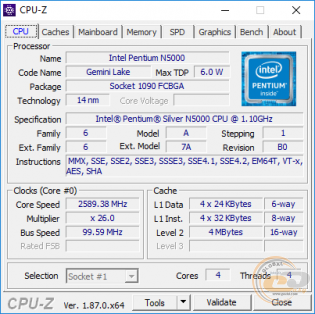
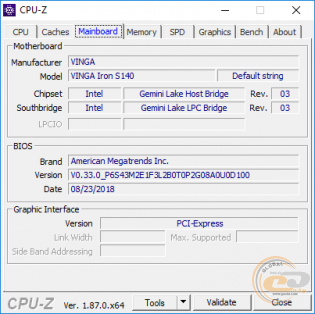
The configuration of the test Vinga Iron S140 includes a 4-core 6-watt SoC processor Intel Pentium Silver N5000 (4/4 x 1.1 - 2.7 GHz), built on the 14-nm Intel Goldmont Plus microarchitecture. However, there are simpler versions with a 2-core Intel Celeron N4000 on board.
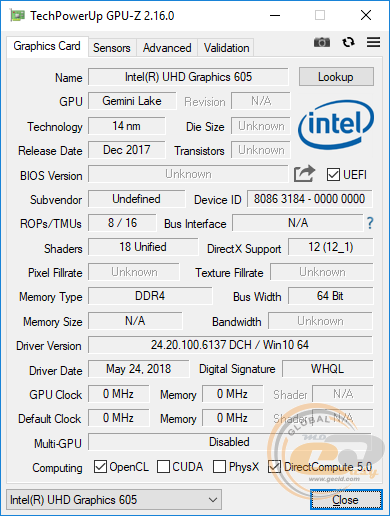
The processor integrates an Intel UHD Graphics 605 graphics core with 18 execution units (EU), a base frequency of 200 MHz, and a dynamic speed of 750 MHz. It is characterized by support for API DirectX 12, OpenCL 2.1, OpenGL 4.5, Vulkan 1.0, and the ability to encode/decode H.264, H.265 (HEVC), and VP9 video. The maximum output image resolution is claimed to be 3840 × 2160 with a refresh rate of 60 Hz.

The built-in memory controller supports DDR4/LPDDR4-2400 standard modules in dual-channel mode with a maximum capacity of up to 8 GB. In this case, 4 GB of LPDDR4-2400 standard is soldered on the board in single-channel mode.
The disk subsystem of Vinga Iron S140 is represented by a 64 GB eMMC 5.1 flash drive. It demonstrates familiar performance: the sequential read speed of non-compressed data reaches 127 MB/s, and writes - 97 MB/s.

After turning on, the user has about 40 GB of free space left. It won't be possible to store movies and music, but it's enough for an office suite and a couple of simple programs. If necessary, the internal storage can be expanded with an M.2 drive up to 80 mm long. You can also always buy a flash drive/memory card or an external hard drive.

Wireless communication is carried out using the Intel Wireless-AC 3165 combined network adapter. It supports 802.11ac Wi-Fi and Bluetooth 4.2 standards with a maximum data transfer rate of 433 Mbps. Everything works stably.

Our laptop comes with pre-installed 64-bit Windows 10 Pro. There are also options without an OS available for sale, which will allow you to save a little.
|
Benchmark |
Results |
|
|
3DMark |
Ice Storm, points |
30 121 |
|
Cloud Gate, points |
3 768 |
|
|
Night Raid, points |
1 624 |
|
|
Sky Driver, points |
2 117 |
|
|
Fire Strike, points |
539 |
|
|
VRMark Orange Room, points |
257 |
|
|
PCMark 10 |
Essentials, points |
4564 |
|
Productivity, points |
2999 |
|
|
Digital Content Creation, points |
1393 |
|
|
Geekbench 4 |
Single-Core, points |
2 024 |
|
Multi-Core, points |
5 899 |
|
|
OpenCL, points |
12 162 |
|
|
Cinebench R15 |
OpenGL, FPS |
23.51 |
|
CPU, points |
263 |
|
|
CPU (Single Core), points |
78 |
|
|
Corona 1.3 Benchmark |
Render time, s |
1091 |
|
7-ZIP |
Total Rating, MIPS |
8 939 |
|
x265 HD Benchmark |
Encoding time, s (FPS) |
256 (4.40) |
The performance of Vinga Iron S140 is sufficient for light internet surfing, video viewing, working with an office suite, and other resource-light programs. However, do not overload the laptop with a large number of such tasks. Since we only have 4 GB of RAM in single-channel and an energy-efficient processor: sometimes it may "think" and even slow down. But with moderate loads, everything is at an acceptable level.
|
Game |
Graphics Settings (1920 × 1080, no AA, fps) |
|||||||||
|
Minimum |
Medium |
Maximum |
||||||||
|
World of Tanks 1.2 |
27 |
– |
– |
|||||||
|
Heroes of the Storm |
28 |
– |
– |
|||||||
|
Similar laptops are not designed for gaming, but if you have strong nerves and are not bothered by low frame rates, you can run projects like World of Tanks, Heroes of the Storm, Hearthstone, and Dota 2 on minimum settings at 1080p, but it's better to switch to 720p right away. Of course, you can always look for simple browser or card games. Cooling system, noise level, temperature regime, and power consumption The advantage of an energy-efficient platform is its very modest heat dissipation. Therefore, the processor does not heat up much and does not require an active cooling system - a copper plate and a metal case handle heat dissipation perfectly. There are no moving parts, which means there is nothing to make noise. The air temperature in the test laboratory at the time of measurements was 22°C. At idle, the temperature inside the case was at 45°C for the processor and 40°C for the integrated graphics. In the PCMark 10 Extended test, which simulates a real usage scenario (text, spreadsheets, browser, photo editing, video calls, gaming graphics), the temperature indicators rose to 103°C for the processor cores and 85°C for the integrated graphics. But this was only in particularly heavy moments, where throttling (61%) was observed. On average, the temperatures were at comfortable levels of 68°C and 55°C for the CPU and iGPU, respectively. In games (World of Tanks) or AIDA64 stress test, the CPU temperature is in the range of 73-82°C, and the iGPU - 62-67°C. Only in the first case did monitoring once record a spike in throttling (at 18%), but the graph clearly shows that the frequencies did not drop further. Considering that this is not a gaming machine, there is nothing critical here. During normal use, the laptop case has room temperature. During prolonged maximum load, the base and the area to the left above the keyboard warmed up to a warm state. Simply put, you can work with the laptop on your lap without fear. Finally, let's take a look at the power consumption of the novelty in different operating modes:
Power supply, battery, and battery life The laptop comes with a small Vinga VPA-1202001 power supply. The input signal parameters are 100-240 V at 0.5 A and a frequency of 50-60 Hz. The output is 12 V at 2 A. During operation, it heated up to a comfortable 35°C. Its cable length of 1.2 m can cause some inconvenience, especially when the socket is on the other side, and you have to look for an extension cord or sit in tension. Usually, standard laptop chargers have a cable with a larger margin. Vinga Iron S140 is equipped with a non-removable lithium-polymer battery with a capacity of 5000 mAh (37 Wh, 7.4 V). According to the manufacturer, it lasts for 6 hours of operation. The results of its testing are summarized in the following table (in all cases, Wi-Fi and Bluetooth are activated):
On average, you can expect 5-6 hours of battery life in mixed mode. There is no fast charging. Conclusions Vinga Iron S140 is an affordable ultra-compact 14-inch laptop for solving simple everyday tasks. It has a full-metal body with a pleasant design, a minimal set of ports and communications, a convenient backlit keyboard, a touchpad with a fingerprint scanner, and a simply gorgeous Full HD IPS display for its price. The hardware platform in the form of a 4-core Intel Pentium Silver N5000 processor, 4 GB of RAM, and 64 GB of ROM demonstrates low performance, but it is enough for regular office and multimedia tasks. However, the novelty is completely silent and has decent battery life. As for competitors, a thin and light laptop with similar hardware will cost significantly more. Yes, it will already have a full-fledged 128 GB SSD. But for the price difference, you can easily install a 240-256 GB or even larger drive yourself. Fortunately, the Vinga Iron S140 has a free M.2 port with quick access. If size and weight are not that important to you and you don't mind a plastic case, then by paying a little extra, you can get a more productive "fifteen", but that's a completely different class of devices. Therefore, you need to clearly understand what and why you are buying. Advantages:
Disadvantages:
Author: Віктор Єфіменко
| ||||||||||