The Vinga BlackGold and Vinga Sain 1 cases appealed to us due to their combination of an attractive price (only about $35) and a number of pleasant features. Among the latter are a large semi-transparent side window, sufficient internal space for installing bulky components, dust filters, and anti-vibration pads. In this price range, these are the most pleasant little things that are not so often encountered.
But what else can a solution with a price tag of about $50-55 offer? Are there many differences from the more affordable counterparts, and is it worth paying extra for them – let's try to find out using the example of the Vinga Titan case.
Specification
|
Model |
Vinga Titan |
|||
|
Case Size |
Middle Tower |
|||
|
Supported Motherboard Form Factors |
ATX / microATX / Mini-ITX |
|||
|
Color |
Black |
|||
|
Bays |
External |
2 x 5.25” |
||
|
Internal |
2 x 3.5” / 2.5” 3 x 2.5” |
|||
|
Expansion Card Slots |
7 |
|||
|
Maximum Graphics Card Length (in brackets - own measurements) |
415 mm (405 mm) |
|||
|
Maximum CPU Cooler Height |
175 mm |
|||
|
Ports |
2 x USB 3.0 2 x USB 2.0 2 x audio ports |
|||
|
Fan Installation Options |
Front Panel |
2 x 120-mm |
||
|
Rear Panel |
1 x 120-mm |
|||
|
Top Panel |
2 x 140-mm / 120-mm |
|||
|
Power Supply |
None |
|||
|
Materials |
Front and Top Panels |
Plastic |
||
|
Chassis |
Steel thickness 0.6 − 0.65 mm |
|||
|
Sides |
Steel thickness 0.81 mm |
|||
|
Case Dimensions (in brackets - own measurements) |
503 x 472 x 230 mm (507 x 474 x 232 mm) |
|||
|
Manufacturer's Website |
||||
Packaging and Supply Kit
The inexpensive packaging is familiar to us from the lower-end solutions. However, here it is not standardized and carries an image of the specific device inside.
Neither the box nor the kit will hit your wallet. Everything here is as simple and accessible as possible. Thus, along with the case, we found:
- a set of screws and standoffs for motherboard installation;
- a set of screws for securing the power supply and drives;
- a system speaker;
- cable ties.
Appearance
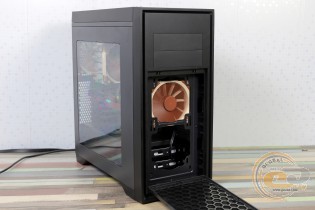
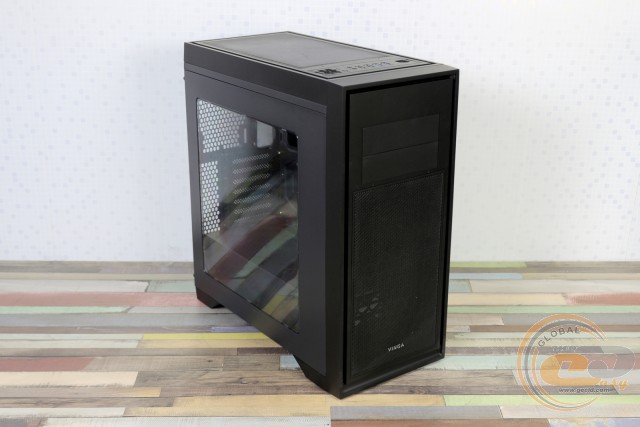
The matte front panel of the Vinga Titan looks quite strict. The practicality is pleasing not only in the coating but also in the presence of a pair of 5.25" bays and a removable mesh at the bottom. Recall, in the aforementioned solutions, accessing the front fans required removing the entire panel. Here, a light press on the top of the frame is enough, after which the mounting locations for a pair of 120-mm fans will be revealed. Unfortunately, a dust filter for them is not provided.
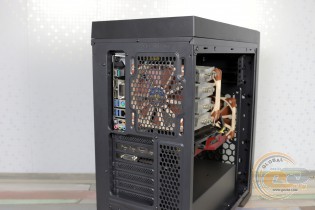
Painted black, the rear part (by the way, like the entire chassis) can accommodate a 120-mm fan with slight height adjustment. Below are seven expansion slots with reusable perforated plugs, as well as a place for installing the power supply. The sides are attached in the usual way – with thumbscrews.
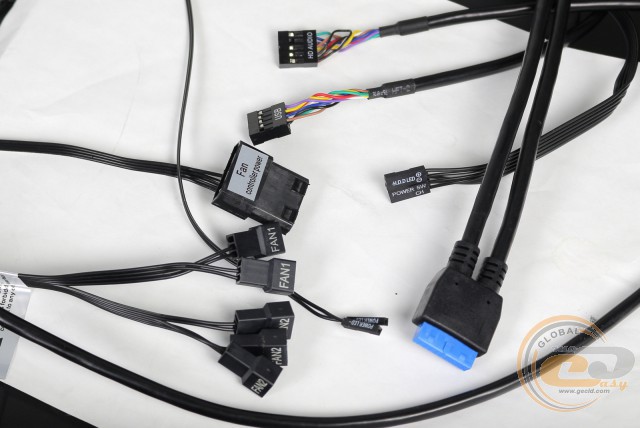
However, calling the top panel of the Vinga Titan usual is not quite right, which, nonetheless, we also consider a plus. Firstly, there is an interface panel, where you can find a pair of USB 3.0 and USB 2.0, audio ports, power and reset buttons, power and hard drive activity indicators, as well as two sliders for setting the fan rotation mode.
Each switch is responsible for its own channel: two propellers can be connected to "Front" and three more to "Top". There are three operating positions: the upper "H" corresponds to the maximum rotation speed, the lower "L" to the minimum, and the intermediate position is intended to turn off the fans completely. When installing multiple case fans, this system will allow achieving the best acoustic performance depending on the way the PC is used. For example, completely turning off the propellers when watching movies or doing office work and turning them on fully during gaming sessions.
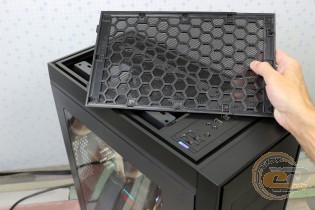
There is also a perforated cover on the top panel, similar to the front one, which provides access to the mounting locations for a pair of 140-mm / 120-mm propellers or a 240-mm radiator. Recall that in more affordable solutions, the latter could only be placed behind the front panel (which, by the way, is also possible in this new model). However, when installed on top, the heated air will be immediately expelled outside.
The bottom of the Vinga Titan boasts elongated feet with a height of 28 mm, which harmoniously fit into the design. An additional millimeter is added by the rubber pads that protect the surface on which the system unit will be placed. The PSU installation location, as expected, has a removable dust filter.
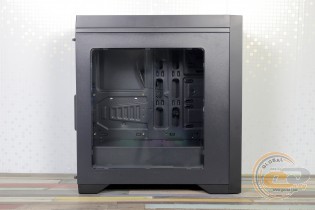
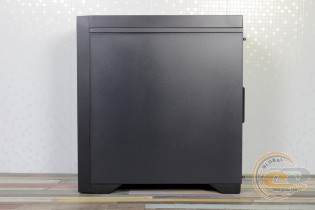
The acrylic window is large in size - 357 x 335 mm, allowing even the tunnel to be visible. It is pleasing that it is made of transparent material, so the components can be viewed even without lighting.
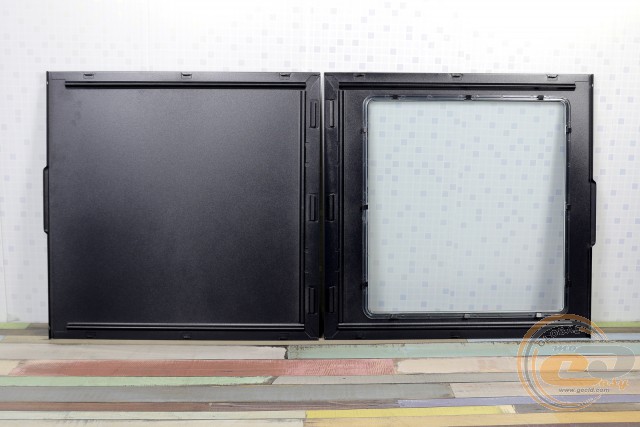
The side panels have sufficient rigidity. Dismantling is done quite traditionally - by sliding to the back of the case.
Internal Structure
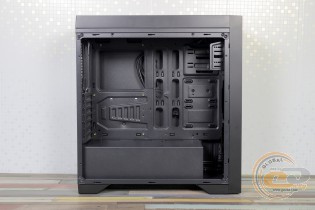
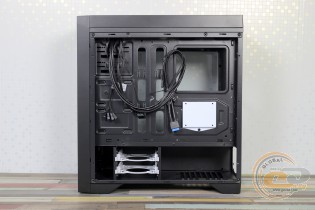
The tunnel at the bottom is common to all branded solutions we have tested. It is generally absent only in the cheapest representatives of this brand with top-mounted PSUs.
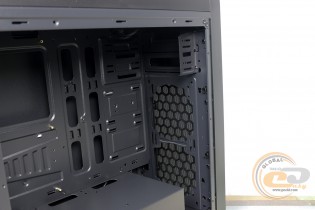
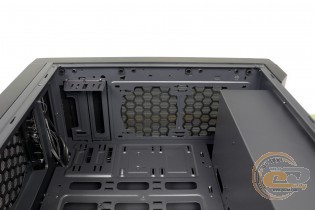
The 5.25" device bays have disposable metal plugs. Traditionally for the manufacturer's cases, the left mount is short, so the same optical drive is preferably additionally secured on the right.
The drives should not limit the length of the graphics card - this is apparently the manufacturer's opinion. Therefore, the mounting locations for two 3.5" hard drives are provided in the tunnel, where a non-removable cage with a pair of trays is located. If desired, 2.5" drives can also be secured here using screws.
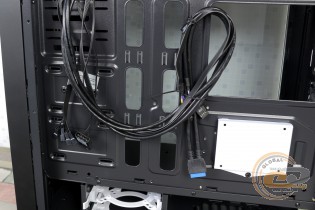
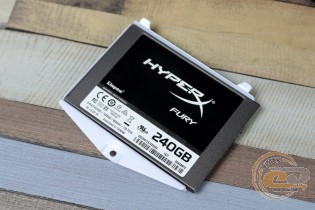
Exclusively for SSDs and compact hard drives, the Vinga Titan has three more mounting locations on the tray: two near the front panel and one behind the motherboard. In the latter case, a removable tray is used, secured with a single screw with a regular screwdriver head. The black-and-white combination is pleasing to the eye and reminiscent of the approach of some well-known manufacturers. Well, no patent is needed for it, so it can be used in every case.
The hard drive cage somewhat limits the length of the power supply. In principle, 170-mm models will fit here (with 40-mm space for power cables), but it will be most convenient to connect a standard 140-mm solution (in the photo, a compact 650W model Fractal Design INTEGRA M 650W).
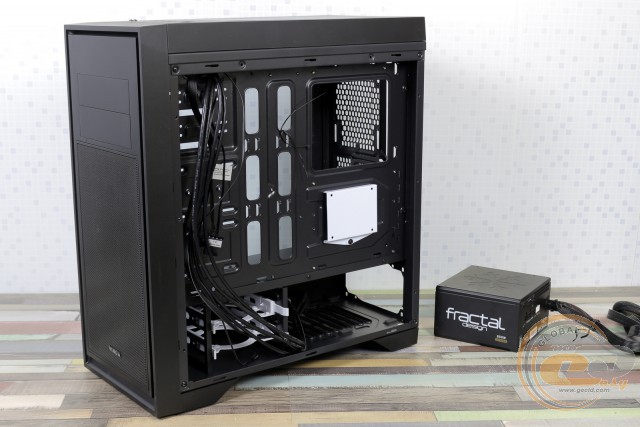
The PSU installation location is carefully equipped with anti-vibration elements at the bottom. In the younger Vinga Sain 1 solution, we also saw perforation in the tunnel, but this model no longer has it.
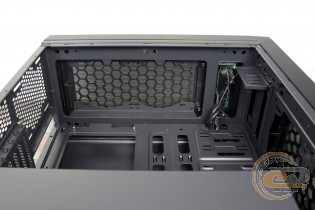
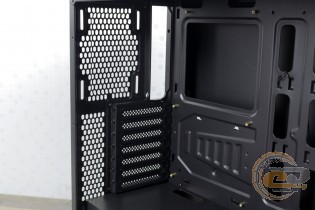
The top panel is perhaps one of the main highlights of the novelty. It not only has a rich set of control elements but also allows placing a liquid cooler radiator at a sufficient distance from the motherboard. The rear part, however, does not stand out with anything particularly noteworthy.
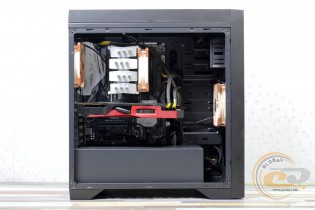
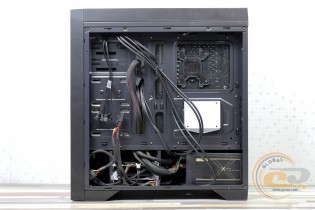
We have no complaints about assembling the system inside the Vinga Titan. There is more than enough free space, so this process will not present any difficulties. And the presence of space behind the tray will allow achieving proper aesthetics, even if an openly budget power supply with numerous cables sticking out in all directions is used.
There is also quality fitting of parts, no gaps, sharp edges, or vibrations during operation. The rigidity is not record-breaking, but there is no reason to complain in this regard.
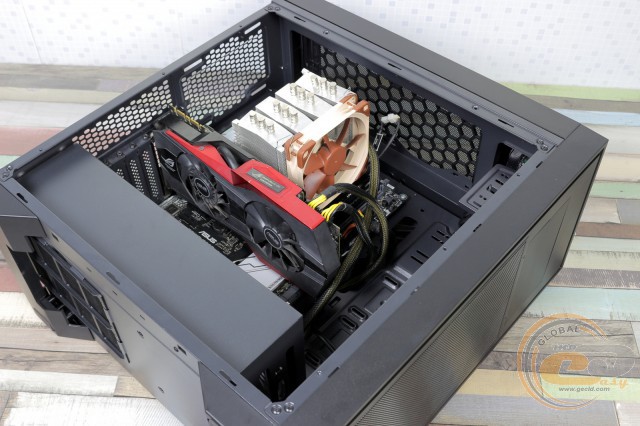
The graphics card ASUS ROG Matrix Platinum GTX 980 with a length of 309 mm easily fits inside, and the free space behind it clearly hints at the possibility of installing even larger three-fan solutions (for example, GTX 1080 Ti), the length of which can reach 405 mm. If you decide to install a radiator on the front panel, this figure will be reduced to still considerable 345 mm.
The height of the CPU cooler is limited to 175 mm, which means, in general, it is not limited. At least no model comes to mind that would not fit here. Replacing the cooler will also be trouble-free, as there is no need to dismantle the motherboard to install and remove the reinforcement plate.
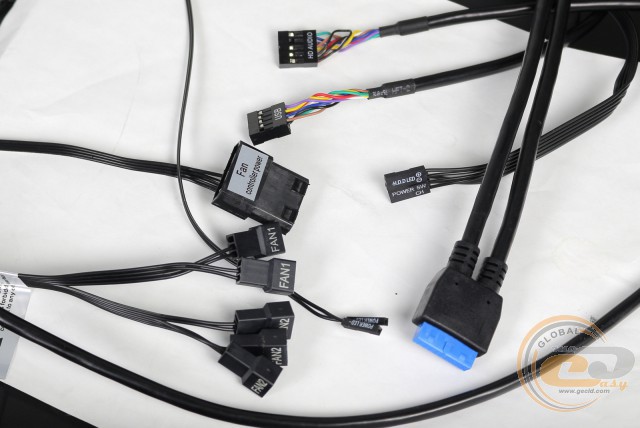
The cables coming from the front panel are of sufficient length, and the holes in the tray will allow them to be routed to the motherboard as inconspicuously as possible.
|
Name |
Length, cm |
|
USB 3.0 |
80 |
|
USB 2.0 |
70 |
|
HD Audio |
70 |
|
Buttons and Indicators |
50 – 60 |
|
PATA (Molex) |
30 |
|
Fan (5 units) |
30 |
Testing
|
Processor |
Intel Core i7-7700K (Socket LGA1151, 4.2 GHz, L3 8 MB) |
|
Cooler |
Scythe Mugen 3 |
|
Motherboard |
ASUS PRIME Z270-A (Socket LGA1151) |
|
RAM |
2 x 8 GB DDR4-2400 HyperX Fury HX424C15FBK2/16 |
|
Graphics Card |
ASUS GeForce GTX 980 MATRIX PLATINUM 4GB GDDR5 |
|
SSD |
SSD KINGMAX SME35 Xvalue |
|
Power Supply |
Seasonic X-560 Gold (SS-560KM Active PFC, ATX, 560W) |
|
Thermal Paste |
Noctua NT-H1 |
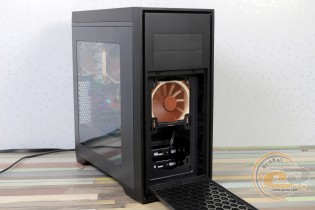
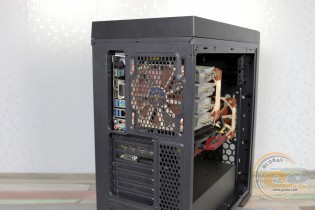
Since we are testing far from an office system, a pair of Noctua NF-F12 PWM fans were additionally installed inside the Vinga Titan for intake and exhaust (1500 RPM).
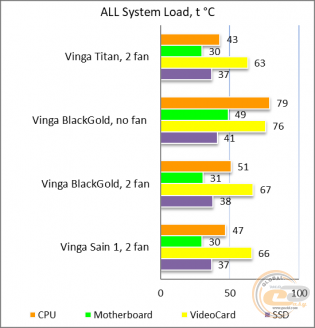
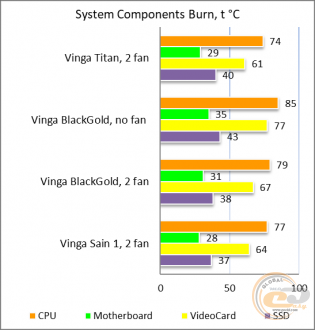
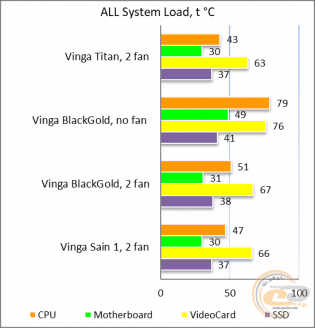
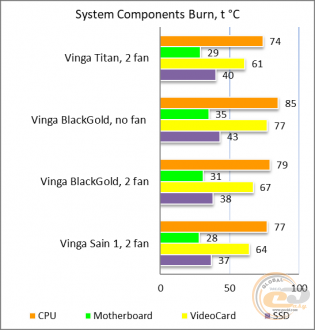
The "All System Load" diagram shows the heating of components after 30 minutes of 3DMark Fire Strike in Ultra mode (4K resolution). The "System Component Burn" mode demonstrates temperatures under load with AIDA64 applications (Stress CPU and FPU) and MSI Kombustor for 15 minutes.
Due to the update of the test bench, we only have other models from the manufacturer's lineup for comparison. Against their background, the novelty looks like a clear leader in terms of temperature indicators of the components with the highest heating – the processor and graphics card. And this is despite the fact that the room temperature reached +29.5°C. And if you compare the obtained results with expensive gaming solutions (do not forget about changes in the test bench), this case looks very attractive. After all, the perforations at the front and top have a positive effect. However, if you want to achieve similar results, you will need to allocate a separate budget for fans, which are not included in the package.
Conclusions
So, is it worth paying for the Vinga Titan case $50-55, when more affordable solutions from the manufacturer can be purchased for approximately $35? Perhaps below we will simply summarize our opinion about the novelty, and you will answer this question yourself in the comments.
The advantages of the younger siblings remain in place: a tunnel at the bottom of the case, plenty of free space inside due to the absence of a drive rack, the ability to install up to five SSDs, ample space for hidden cable management, and a number of pleasant little things. But what has changed?
Firstly, a 240-mm radiator can now be installed under the top panel, and in this case, the heated air will be immediately expelled outside the case. Secondly, the mounting holes for fans on the top and front panels have become very accessible with the help of removable perforated elements. They also allow for the intake and exhaust of more air than solid panels with side perforations. Thirdly, the interface panel has acquired another USB 3.0 and, much more interestingly, a pair of switches that allow you to adjust the fan speed (2 modes) or turn them off completely.
As a result, the Vinga Titan case is perfectly suited as a base for building a gaming PC with a powerful graphics card, as well as a large CPU cooler or liquid cooling system. The transparent window will allow you to admire the components under any lighting. The only thing that truly puzzled us is the absence of dust filters on the top and front panels, so be prepared for frequent cleaning.
Advantages:
- strict design with practical matte elements;
- large transparent acrylic side window;
- good build quality;
- ability to install long 405-mm graphics cards and 175-mm CPU coolers;
- ability to install up to five fans and a 240-mm radiator;
- ability to install up to five drives;
- presence of soft feet, as well as vibration-absorbing elements and a dust filter under the PSU;
- ample space for hidden cable management;
- ability to control fans using sliders on the front panel;
- excellent temperature indicators of components when a pair of fans is installed.
Features:
- complete absence of pre-installed fans;
- ability to install only a pair of 3.5" drives.
Disadvantages:
- absence of dust filters on the top and front panels.
Author: Oles Pakholoк
Translation: Yuriy Koval
We express our gratitude to ASUS, Intel, Noctua, Sea Sonic Electronics and the brand HyperX for providing equipment for the test bench.